mkdocs-document-dates

English | 简体中文
mkdocs-document-dates, a new generation MkDocs / ProperDocs plugin for displaying exact creation date, last updated date, authors, email of documents.

Features
- Works in any environment (no-Git, Git environments, Docker, all CI/CD build systems, etc.)
- Support list display of recently updated documents (in descending order of update date)
- Support for manually specifying date and author in
Front Matter - Support for multiple date formats (date, datetime, timeago)
- Support for multiple author modes (avatar, text, hidden)
- Support for manually configuring author's name, link, avatar, email, etc.
- Flexible display position (top or bottom)
- Elegant styling (fully customizable)
- Multi-language support, localization support, intelligent recognition of user language, automatic adaptation
-
Ultimate build efficiency: O(1), no need to set the env var
!ENVto distinguish runsBuild Speed Comparison: 100 md: 1000 md: Time Complexity: git-revision-date-localized
git-authors
> 3 s
> 30 s
O(n)document-dates < 0.1 s < 0.15 s O(1)
Installation
The MaterialX for MkDocs theme has this plugin built-in, if you are using this theme, no separate installation is required.
If you wish to use it independently, you may install it via pip:
Configuration
Add the following lines to mkdocs.yml / properdocs.yml:
Or, common configuration:
The following configuration options are supported:
| Option | Valid value | Default | Description |
|---|---|---|---|
| position | top, bottom |
top |
specify the display position of the plugin |
| type | date, datetime, timeago |
date |
specify the type of date to be displayed |
| exclude | [] | none | specify a list of excluded files |
| date_format | '%Y-%m-%d' | specify the date formatting string | |
| time_format | '%H:%M:%S' | specify the time formatting string, valid only if type=datetime | |
| show_created | true, false |
true |
specify whether to display the creation date |
| show_updated | true, false |
true |
specify whether to display the last updated date |
| show_author | true(avatar), false(hidden), text(text) |
true |
specify the type of author display |
Settings
The plugin provides a wide range of customization options to meet various personalized needs.
Date & Time
The date data is retrieved using a combination of different methods to adapt to various runtime environments, including no-Git environments, Git, Docker containers, and all CI/CD build systems:
- Uses filesystem timestamp to ensure accurate original dates in local no-Git environments
- Uses Git timestamp to ensure relatively accurate dates in Git environments
- Uses cache file to ensure accurate original dates in Git environments
- Front Matter: Manually specify the date in Front Matter if you prefer not to use automatic dates
Why not use filesystem timestamps in Git environments ?
Because files are recreated during git checkout or git clone, causing the original timestamps of branches/files to be lost after cloning or checking out.
Loading order
By default, the plugin will automatically load the document's "creation date" and "last updated date" in the following order.
%%{init: {'theme': 'default', 'themeVariables': {'fontSize': '12px'}}}%%
flowchart LR
    A(1.Front Matter)
    B(2.Cache File)
    C(3.Git Timestamp)
    D(4.File Timestamp)
    A -.Creation date.-> B -.-> C -.-> D
A -.Last updated.-> C- Prioritize reading the custom creation date in Front Matter
- Then read the creation date in the cache file
- Next read the document’s first git commit date as the creation date
- Finally read the file’s creation time
- Prioritize reading the custom last updated date in Front Matter
- Then read the document’s last git commit date as the last updated date
- Finally read the file’s modification time
Customization
This can be specified in Front Matter using the following fields:
- Creation date:
created,date - Last updated:
updated,modified
Cache creation date
In the Git environment, the plugin reads the document's "first git commit date" as the creation date by default. However, if you need to retrieve the original creation date of the document (earlier than the first git commit), you can manually install Git hooks to use a caching mechanism to solve this issue. Navigate to the target repository directory in the terminal and execute the following command to install Git hooks:
This command installs the pre-commit hook locally in the root directory of the target repository, located at
.githooks/pre-commit.
Afterwards, every time you execute git commit, the cache file containing the creation date will be automatically generated (hidden by default) in the docs directory, and this cache file will also be committed automatically.
docs/.dates_cache.jsonl, cache filedocs/.gitattributes, merge mechanism for cache file
This method is compatible with CI/CD build systems, which will automatically detect and load the cache file.
Configure git fetch depth
In the CI/CD system, if the "creation date" uses the "first git commit date" (i.e., no custom or cache file date), you need to configure git fetch depth in the CI system to retrieve the correct first git commit record. For example:
| .github/workflows/ci.yaml | |
|---|---|
Author
Loading order
The plugin will automatically loads the author information of the document in the following order, and will automatically parse the email and then do the linking.
%%{init: {'theme': 'default', 'themeVariables': {'fontSize': '12px'}}}%%
flowchart LR
    A(1.Front Matter)
    B(2.Git Author)
    C(3.site_author)
    D(4.PC Username)
A -.-> B -.-> C -.-> D- Prioritize reading custom authors in Front Matter
- Then read the Git author (support
Co-Authored-Byco-authors) - Next read the site_author in mkdocs.yml
- Finally read the PC username
Customization
Can be configured in Front Matter in the following ways:
1) Configure a simple author: via field name
2) Configure one or more authors: via field authors
Enhanced author configuration
For a better user experience, you can add full configuration for all authors. To do so, create an authors.yml file in the docs/ folder using the format below:
| docs/authors.yml | |
|---|---|
When the author name in Front Matter, Git Author, site_author(mkdocs.yml) matches the key in authors, the full author information of the key will be automatically loaded.
You can exclude specific authors (such as bots or automation accounts) by setting ignore: true, exclude: true, or hidden: true.
Git author aggregation
Git author support account aggregation, i.e. multiple different email accounts for the same person can be aggregated to show the same author, which can be configured by providing a .mailmap file in the repository root directory, this is also a feature of Git itself, see gitmailmap for more details.
The following example unifies my other Git accounts and displays them as Aaron <junewhj@qq.com>:
| .mailmap | |
|---|---|
Mailmap rules apply to both primary commit authors and Co-Authored-By trailers in commit messages.
Avatar
Loading order
The plugin will automatically loads the author avatar in the following order.
%%{init: {'theme': 'default', 'themeVariables': {'fontSize': '12px'}}}%%
flowchart LR
    A(1.Front Matter)
    B(2.Online Avatar)
    C(3.Character Avatar)
A -.-> B -.-> CCustomization
Customizable via avatar field in Enhanced author configuration (supports URL paths and local file paths).
Other avatars
Load from Gravatar or Weavatar based on Git's user.email
Automatically generated based on the author's name with the following rules:
1. Extract initials: English takes the combination of initials, other languages take the first character
2. Generate dynamic background color: Generate HSL color based on the hash of the name
Structure and Style
You can configure the display structure of the plugin in the following ways in either mkdocs.yml or Front Matter.
Configuration structure
Global Toggle, configured in mkdocs.yml:
| mkdocs.yml | |
|---|---|
Local Toggle, configured in Front Matter (using the same field names):
Note
When used in combination, the global toggle acts as the master switch, and the local toggle only takes effect when the master switch is enabled. This does not follow the logic of local configurations overriding global ones.
Configuration style
You can quickly set the plugin styles through preset entrances, such as icons, themes, colors, fonts, animations, dividing line and so on. Download the config template file into docs/assets/document_dates/ and uncomment it:
| Category: | Location: |
|---|---|
| Style & Theme | docs/assets/document_dates/config.css |
| Properties & Functions | docs/assets/document_dates/config.js |
Template Variables
You can use these variables in any template or plugin to access document metadata:
Set correct lastmod for sitemap
You can set the correct lastmod for your site's sitemap.xml with the template variable document_dates.dates.updated so that search engines can better handle SEO and thus increase your site's exposure
Step: Download the sample template sitemap.xml, and override this path docs/overrides/sitemap.xml
Recustomize plugin
The plugin can be re-customized using templates, you have full control over the rendering logic and the plugin is only responsible for providing the data
Step: Download the sample template source-file.html, and override this path docs/overrides/partials/source-file.html, then freely customize the template code
Recently Updated Module
The recent updates module displays site documentation information in a structured way, which is ideal for sites with a large number of documents or frequent updates, allowing readers to quickly see what's new.
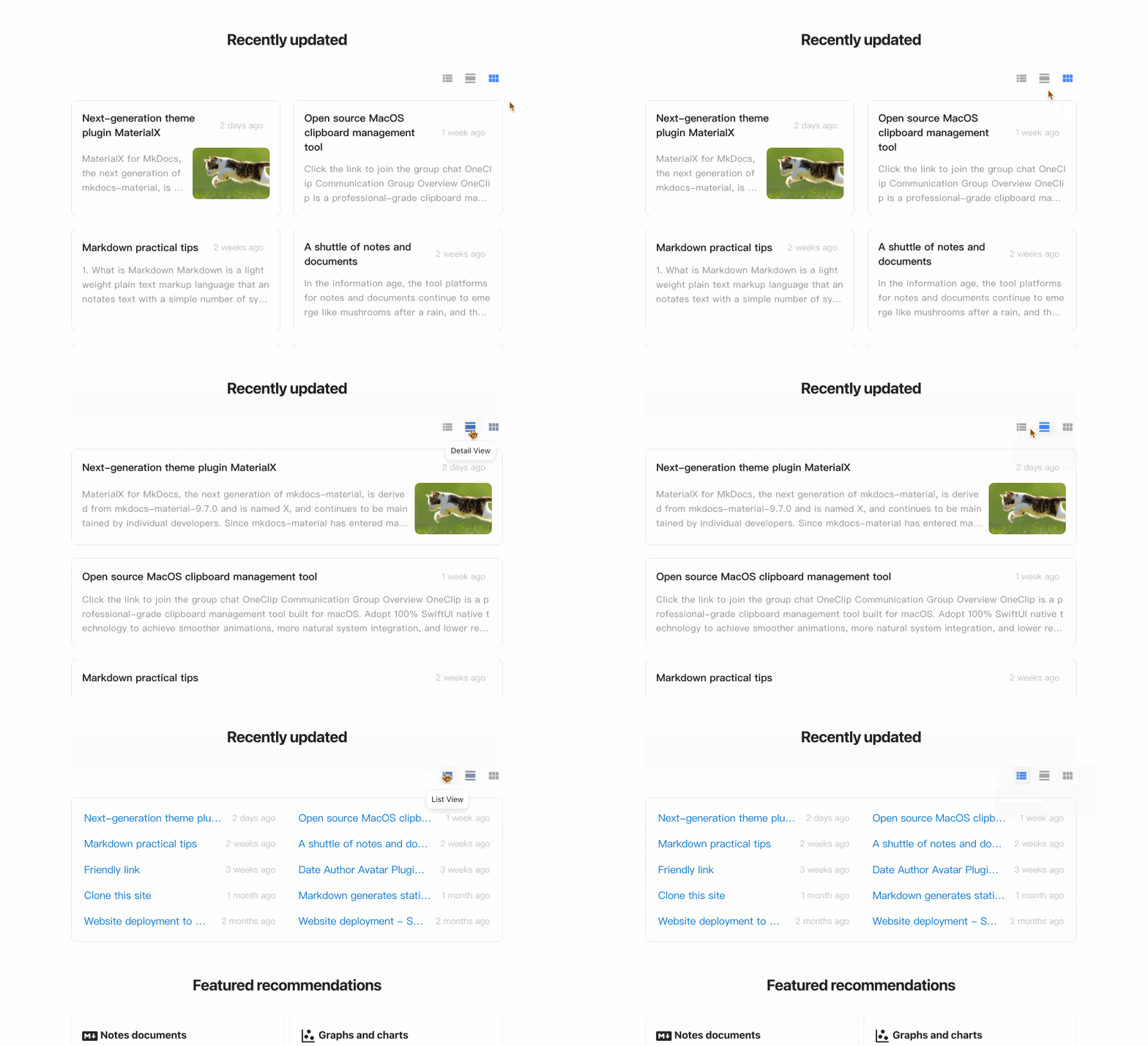
You can get the recently updated document data (in descending order of update date) in any template via the variable config.extra.recently_updated_docs, then customize the rendering logic yourself.
Or just use the preset template:
- Display recently updated documents in descending order by update time, list items are dynamically updated
- Support multiple view modes including list, detail and grid
- Support automatic extraction of article summaries, no manual configuration required
- Support for customizing article cover in Front Matter
Config switch
First, configure the switch of recently-updated in document-dates:
| mkdocs.yml | |
|---|---|
Add to sidebar navigation
Download the sample template nav.html, and override this path docs/overrides/partials/nav.html
Add anywhere in document
Insert this line anywhere in your document:
Configure article cover
You can specify an article cover in Front Matter using the field cover (supports URL paths and local file paths):
Summary Line Configuration
The plugin intelligently parses article content and simply refine the summary without manual configuration. The number of summary lines can be configured separately for grid and detail views:
Reading Time Estimation
The plugin intelligently analyzes article content, extracts valid information and estimates reading time.
- Supports calculation for various Markdown blocks, including tables, fenced blocks, math blocks, images and more
- Supports all mainstream languages and mixed-language
- Space-delimited languages: English, Spanish, French, German, Portuguese, Russian ...
- CJK languages: Chinese, Japanese, Korean
Calculation Rules
| Valid Element | Calculation Method | Notes |
|---|---|---|
| Space-delimited languages | 240 words / min | Based on common industry standards |
| CJK languages | 480 characters / min | Based on common industry standards |
| Tables | 2s / row | Simple row-based estimation for variable-length content |
| Fence blocks | 1s / row | Includes code blocks, text blocks, YAML blocks, etc. |
| Math blocks | 4s / block | Rough estimation based on individual blocks |
| Images | 2s / image | Typical for blog post images: 2~3 seconds per image |
| Front Matter | Skipped | Generally not visible after rendering |
| HTML blocks | Skipped | Images inside HTML are counted, other content ignored (Markdown-focused) |
| Quotes & links | Skipped | Link text for href is generally not visible after rendering |
| Other invalid characters | Skipped | For example, whitespace, blank lines, special symbols, markup characters, etc. |
This reading time calculation function is exposed publicly. You may call it from any plugin or hook to get the estimated reading time and concise summary of Markdown content. Refer to analyze_markdown.
Configure Reading Speed
Reading speed varies by language, content type and personal reading habits. The default values are set based on average user behavior. You may manually adjust the speed if the defaults do not match your actual usage.
Localization Language
The plugin's tooltip and timeago have built-in multi-language support, and the locale is automatically detected, so you don't need to configure it manually. If any language is missing, you can add it for them.
For tooltip
Built-in locales: en zh zh_TW es fr de ar ja ko ru nl pt
Addition Method (choose one):
- In
config.js, refer to Part 3 to add it by registering yourself - Submit a PR for Inclusion
For timeago
When type: timeago is set, the timeago.js library is enabled for dynamic time rendering. The built-in locales in timeago.min.js only include en zh. If you need to load other languages, you can configure it as described below (choose one):
- In
config.js, refer to Part 2 to add it by registering yourself - In
mkdocs.yml, configure the full version oftimeago.full.min.jsto reload all locales
Developer API
This plugin also exposes the following APIs for developers, making it easy to retrieve exact dates, reading time and other information in other plugins or hooks.
load_dates_and_authors
You can use this function to retrieve the date and author information for all site documents at once, it returns either Git or file-system-based dates and authors for each document.
load_dates_and_authors(docs_dir_path: Path, files: Files)
Parameters:
docs_dir_path(Path) - path to the docs directory of the projectfiles(Files) - global files collection
Returns:
Dict[str, Dict[str, Any]]- a dictionary containing all documents, built from the document relative path, date, author, and other information
The return data structure is as follows:
An example of calling the function is shown below:
Note
- Do not call this function in Page Events, it should only be called once in Global Events. For the event lifecycle, please refer to Events.
- This function does not parse Markdown content, so dates and authors defined in frontmatter need to be handled separately. For example, you may first try to retrieve manually configured dates and authors from frontmatter, and fall back to calling this function to get such information if those values are not present, like this:
analyze_markdown
You can use this function to get the estimated reading time and concise summary of Markdown content.
analyze_markdown(md: str, readtime_wpm: int = 240, readtime_wpm_cjk: int = 480)
Parameters:
md(str) - markdown textreadtime_wpm(int, optional) - reading speed per minute for Space-delimited languages (English, Spanish, French, German, Portuguese, Russian, etc.), default is 240 words/minreadtime_wpm_cjk(int, optional) - reading speed per minute for CJK languages (Chinese, Japanese, Korean), default is 480 chars/min
Returns:
tuple[int, str]readtime(int) - reading time in minutessummary(str) - a concise summary of Markdown content
A sample call is shown below:
If you only need the reading time, call it like this:
Refer to Reading Time Estimation for reading time calculation rules.
Development Stories
A dispensable, insignificant little plug-in, friends who have time can take a look ^_^
- Origin:
- Because git-revision-date-localized, a great project. When I used it at the end of 2024, I found that I couldn't use it locally because my mkdocs documentation was not included in git management, I don't understand why not read the file timestamp, but to use the git timestamp, and the file timestamp is exact, then raised an issue to the author, but didn't get a reply for about a week (the author had a reply later, nice guy, I guess he was busy at the time), and then I thought, why not try it myself, and so it was born, in February 2025
- Iteration:
- After development, I understood why not use file timestamp, because files will be rebuilt when they go through
git checkoutorgit clone, resulting in the loss of the original timestamp of the branch/file that was cloned or checked out. There are many solutions:- Method 1: Use the last git commit date as the last updated date and the first git commit date as the creation date,
git-revision-date-localizeddoes this. (This way, there will be a margin of error and dependency on git) - Method 2: Cache the original date in advance, and then read the cache subsequently (The date is exact and no dependency on any environment). The cache can be in Front Matter of the source document or in a separate file, I chose the latter. Storing in Front Matter makes sense and is easier, but this will modify the source content of the document, although it doesn't have any impact on the body, but I still want to ensure the originality of the data!
- Method 3: Configure a custom script git-restore-mtime in the CI system to automatically restore the original file timestamps
- Method 1: Use the last git commit date as the last updated date and the first git commit date as the creation date,
- After development, I understood why not use file timestamp, because files will be rebuilt when they go through
- Difficulty:
- When to read and store original date? This is just a plugin for mkdocs, with very limited access and permissions, mkdocs provides only build and serve, so in case a user commits directly without executing build or serve (e.g., when using a CI/CD build system), then you won't be able to retrieve the date of the file, not to mention caching it!
- Straight to the point: using the Git Hooks mechanism, you can trigger custom scripts when specific Git actions occur, such as every time you make a commit (hook installation is optional)
- How can I ensure that a single cache file does not conflict when collaborating with multi-person?
- Workaround: use JSONL instead of JSON, and with the merge strategy
merge=union
- Workaround: use JSONL instead of JSON, and with the merge strategy
- How to speed up the build when there are more documents ( > 200 )? Every time you fetch a git information, it's usually a file I/O operation, and if there are a lot of files, it can slow down the build considerably, which is intolerable for users (e.g.,
git-revision-date-localizedcan only improve the preview speed by adding the environment variableenabled: !ENVto disable itself locally, which is a bit like burying one's head in the sand)- Solution: skip unnecessary I/O access and reduce the number of I/O operations
- When to read and store original date? This is just a plugin for mkdocs, with very limited access and permissions, mkdocs provides only build and serve, so in case a user commits directly without executing build or serve (e.g., when using a CI/CD build system), then you won't be able to retrieve the date of the file, not to mention caching it!
- Improve:
- Since it's a newly developed plugin, it will be designed in the direction of excellent products, and the pursuit of the ultimate ease of use, simplicity, personalization, intelligence
- Ease of use: no complex configuration, only 2-3 commonly used configuration items, one-click templates are also provided for personalized
- Simplicity: no unnecessary configuration, no-Git dependencies, no CI/CD configuration dependencies, no other package dependencies
- Personalization: fully customizable and full control over the rendering logic, the plugin is only responsible for providing the data
- Intelligence: Intelligent parsing of document date, author, avatar, intelligent recognition of the user's language and automatic adaptation
- Compatibility: works well on older operating systems and browsers, such as Windows 7, MacOS 10, iOS 12, Chrome 63
- Since it's a newly developed plugin, it will be designed in the direction of excellent products, and the pursuit of the ultimate ease of use, simplicity, personalization, intelligence